Showing posts with label rant. Show all posts

10 August 2016

Why servicing UWP IoT apps via the store is such a Big Deal

In the past I have been dealing with IoT equipment made by a manufacturer that shall remain nameless here, but their solution was - like a lot of IoT solutions are today - based on Linux. Now granted, they had a quite nifty data exchange option via LoRa meshing. But updating both firmware and apps was a nightmare. You were constrained to your own network, so pushing out updates was your own responsibility, you had to do that per (sub) network, one by one, app by app.

Now this was (semi) professional sensing equipment, not intented for use by Joe and Jane Sixpack. The stuff that actually can be purchased by Joe and Jane is even in more dire straits. See for instance this horror story about smart locks. Or actually, dumb locks, as it turns out

Now first of all, a lot of these manufacturers are at fault for delivering essentially insufficient safe equipment. What's even worse is that they refuse to fix it. But in the long run, they are actually right about updating the lock software. It has very little sense, as most of the users won't update the lock (or whatever smart device they may have purchased anyway), either because they don't know how to do it, or because they rather watch the Olympics or some other sports event du jour in stead of reading obscure websites about security to keep up to date on the status of their smart lock, light bulb or whatever other gadget they bought (or got from a well intending friend or relative).

The only solution to this, of course, is that both the lock software itself and the firmware could be serviced remotely, without requiring the user to do something. This would of course require some kind of secure communication protocol, centrally guarded... kind of like how a computer or a phone and it's apps are updated. And wouldn't you know it, that is exactly what Microsoft are doing. Rather too quietly in my humble opinion. Maybe because it’s still in preview. But this is a big deal, and I think it deserves a lot more fanfare.

Windows 10 IoT Core can already update itself, so whenever Microsoft adds new features or improves overall security and stability, the base software can be updated without affecting what is running on top of it. Now by making the apps running on it servicable as well, Microsoft are providing the ultimate solution for making IoT devices servicable remotely and securely, without the user having to do anything.

Drawbacks? What if your lock is just about rebooting when you want to go out (or in)? And then there's the age old "quis custodiet ipsos custodes" - who guards the guards? You (and manufacturers) will have to decide whether or not they want to trust Microsoft - a company that has decades of security expertise, a enormous cloud infrastructure, and basically runs on selling trust - or just hope some random hardware dude does a better job and do it right the first time, because they cannot update their stuff once they have sold it.

I think the time is ripe for Smart IoT, and I applaud Microsoft for making this move. I once dreamed about it in a closed conversation with some Microsofties, and now it's coming true. Not doubt my dreaming has nothing to do with it, but the fact that it does come true indeed, is not the less awesome

The second blog post in a row without any code attached to it. My apologies, I will return to code next time ;)

03 August 2016

Why you should update your apps to UWP

Woe is us

No code this time, but a kind of a rant. Or some advice. Whatever you want to call it.

So we all saw the stories. Several pundits all over the world claim Windows Phone is going down, the Windows Store is going nowhere, it’s all going bust, blah blah blah doom and gloom, woe is us. I must admit I’ve been lazy converting my apps from Windows 8.x / Windows Phone 8.x to UWP too. Not out of defaitism, but, well, I got distracted. And for good reason too – there’s now so much fun stuff to play with. First there was IoT Core and some great IoT Azure features, then came HoloLens and UWP on XBox One - it’s hard to set priorities. Especially if you suffer from the shiny new toy syndrome like me ;).

A little confession

So far I have updated only one app to UWP, and submitted it to the store – good old Map Mania. It was my first serious Windows Phone application, dating back to the Windows Phone 7 days; it made it’s transition to 8, 8.1 and was languishing in the store. You can buy it for €0.99, although buying apps is an outdated model in these freemium days, right? And it was not even my most downloaded app – a little over 8000 downloads does not even come close to my more-or-less hit 2 Phone Pong. So why did I chose to update this app specifically? Well, mainly because I use it myself. It’s ability to show Open Street Maps is a great boon when making hikes in more rural places of Europe where the wife and me tend to go on holiday (although it was also great in finding spots around Rome). In addition, I think its ability to show WMS maps is also fun, a throwback to my years as a GIS programmer. And there’s sentimental reasons as well. Anyway, May 11th 2016 Map Mania Universal passed certification. Mission accomplished. I announced its existence with one tweet and forgot about it – because a HoloLens was on it’s way. That is why I am an engineer, not an entrepreneur– I know nothing of marketing, nor am I particularly interested in it.

Money talks. Numbers too

Now three months in, I browsed around some new Dev Insiders Pages on the Dev Center, and found these rather unexpected numbers in the payout pages:

image

Apparently, for every copy of Map Mania for Windows Phone 8.x, I am selling a little over 1.4 UWP copies. But well, ho hum, that’s nice. It’s not exactly breaking the bank.

I am going to share another number with you. Not one that I am very proud of, but what the heck:

image

The point is, look at the latest payout date. June 2015. In fourteen months I have sold for like €10 Map Mania 8.x. copies. But in three months I have sold UWP copies for an amount of  €14.69 . Ergo: I net about 71 cents per month on 8.x, and €4,90 per month on the UWP app. That’s almost seven times as much. It’s still quite not time to call the boss and give my month’s notice, but still - seven times as much. And these are new users - because if you upgraded from an older version, you keep owning it.

What the [redacted]?

How is possible in the light of all the doom and gloom stories? If I check the new download reports I see quite a few Windows 10 mobile acquisitions, a little less tablet acquisitions – but both of those are outnumbered by a bucket load of PC acquisitions. Whatever “PC” may be these days – since Surface saw the light of day, the borders between a laptop and a tablet have become quite hazy.

I’ve been discussing this on Slack with a few people, and with my fellow MVP Ginny Caughey, and we think there are apparently three things at work

  • Relative small store = relative high visibility
  • The huge number of Windows 10 on PC installs is apparently kicking in
  • Those new users are apparently willing to put down money.

Long story short

Update your apps! There is life (and money) in the UWP market. Learn new skills, earn a few bucks, and who knows, maybe you will sell an app to a HoloLens user. But an ‘ordinary’ PC user’s euros, dollars or whatever are currency too, right? There quite a lot more of those.

…and they are willing to pay, apparently.

01 September 2015

Microsoft are not spying on your hard disk because there is nothing to gain - and everything to loose

There is a debating technique that is called "reductio ad absurdum" which demonstrates the validity of a statement by proving that the opposite is impossible (absurd). A common example is "rocks have weight, or else we should see them floating in the air". Without going into technical details, I state that Microsoft are not spying on your hard disk, because

  1. they have nothing to gain from the act itself
  2. there is no way they could prevent destroying themselves in the process - and they know that.

Let's just assume, for the sake of argument, that Microsoft are indeed the bunch of evil scientist some people seem to think they are. Spying on you would require some data gathering process and some process of transmitting data to Microsoft, using your own network connection. Agreed? Well then, with Windows 10 running on 75 million (and counting) machines, a substantial number of those owned by clever d- I mean smart persons - who know very well how to operate network analyzing tools like WireShark, there is no way in Hades they could keep the data transmitting part of that process secret forever. Any spying tool included in Windows 10  will be found. Sooner or later. By those smart people. By anti virus software makers. Or it will be revealed by a whistleblower. Whatever. When - not if - such a spying tool would be discovered, Microsoft would receive crackdowns from both the USA and EU governments that would make their experiences with the DOJ in the bad old days seem like a walk in the park on a sunny day, and they would loose the trust of all their clients overnight. People would stop using Windows, Azure, the whole kit and caboodle'. And what, exactly, would Microsoft have to gain? Your local games score is not that interesting, neither is your local document store. A local store of illegal imagery, music or movies may be of interest to the law, but not to Microsoft - whatever's on your PC is your responsibility.

The only 'spying' that is going on is some telemetry on apps or parts of Windows that run into trouble and report whatever happened when things went South back to Microsoft (or the app developer) to make it easier to fix those bugs. If you opt in for customer improvement programs (and I almost always do) some usage patterns may be transmitted. This is not new, telemetry has been part of the last couple of Windows releases and this is all anonymously, for the same reason - should Microsoft ever be caught red-handed spying on individual users, they would receive hell from all directions, and rightly so.

So why would Microsoft spy on your hard drive? There is nothing to gain, and everything to loose. Microsoft are in the business of making great software and services and making money with that - preferably lots, and they are pretty good and successful at that. They are not into spying, because they won't make money from the act itself but they would put nearly all of their existing money makers in very real danger. It would be just absurd to do that. It would not make sense even when they were indeed an 'evil spying company', which they are not. They are making billions in cloud services, a business primarily based on technical excellence, high availability and above all trust. To put it very bluntly, whatever is on your hard drive cannot possibly be worth violating that trust. You are simply not that interesting - or profitable.I am sorry to have to put it like that, but that is the simple truth.

08 March 2013

Surface RT versus Surface Pro versus the competition for REAL dummies

About every pundit who is somewhat interested in Microsoft either by love or abject hate has written about this already – and still I am going to do my take. Why? Because I am one the few people on this planet who actually was crazy enough to purchase both a Surface RT and a Surface Pro and therefore am entitled to my rant – and because I still get comments like “I think Surface Pro is too expensive for a tablet and has too little battery life for it”, which indicates people still completely don’t get it. With ‘tablet’ almost invariantly people mean “iPad”, by the way.

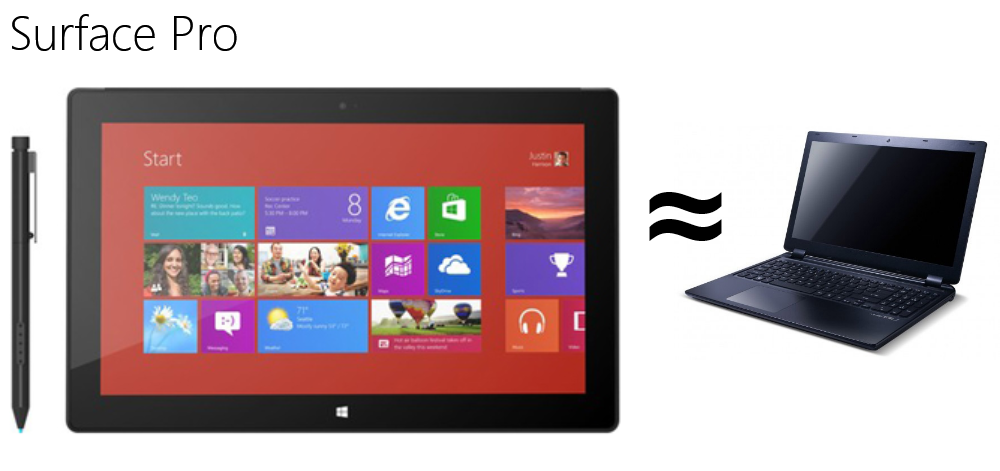
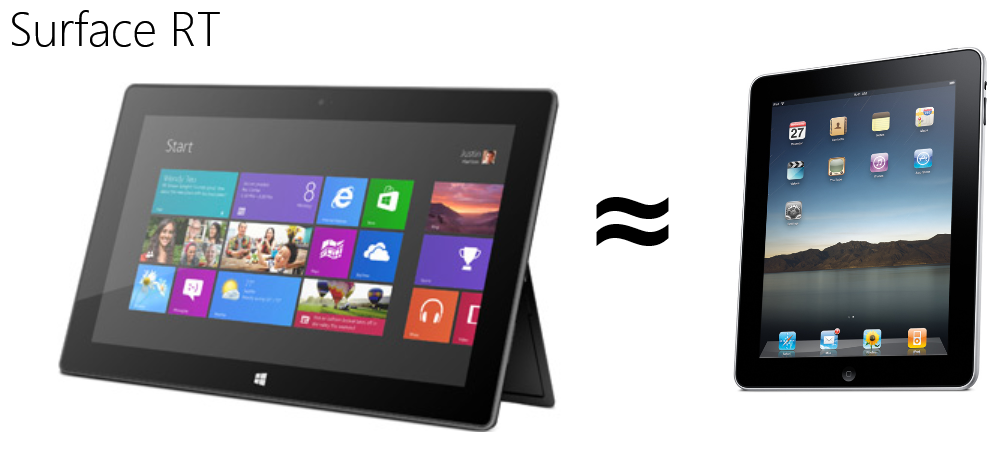
The very short version of this post is this ‘infographic’

pro2RT2

I used a mathematical symbol ≈ which means ‘is equivalent to’. That is something entirely different than “equals to”. Very important distinction. Keep that in mind. I will use a lot of ‘equivalents’ in this blog post rant.

When you think of a Surface RT – think of something that moves in the same space as an iPad. Long battery life, relatively cheap (don’t get me started on Apple pricing), light, ideal for use on your lap or in your hand, good content consumption device. Plus some extras. But let’s not confuse the picture alrimageeady.

When you think of a Surface Pro – think of an Ultrabook. Yes, a real computer. A real powerhouse too, ultra portable, and it runs the full Monty – I mean Windows 8 - but that comes at a price. It’s heavier, more expensive, burns more battery, and it gets hotter too. Of course it does. Look, it’s like saying “My wife has this cute Japanese car that does over 50 miles to the gallon when she’s doing 70 on the interstate but this other car burns much more fuel and generates a lot of exhaust” and then the car you use…

…is the car equivalent of something like this:image
Dude, I have some bad news for you. If there’s indeed the equivalent of an F22 Raptor sitting in your driveway when you just want to do some cruising, you might have paid some more attention to the brochure or might have asked some more questions at the dealer clerk before getting out the ole’ VISA card. This machine can carry more and heavier load than your wife’s car – and it can take it there very much faster. This machine is made for serious business. As is Surface Pro. Only with less pyrotechnics.

Now I will admit Microsoft has made life a little bit more complicated than my simple images and broad statements do justice. That’s because of a very a simple reason: the current state of affairs in electronics, as well as the radical design approach the Surface hardware engineering team took, made it possible that under the “Surface” flag now reside two very similar looking – but very dissimilar devices. It’s like the F22 and your wife’s Japanese car nearly look the same, have the same controls, and even share accessories – but one will be a very good car, the other will take off at supersonic speed and be halfway Some Place Where Bad People Live (and – admittedly – a place where those Bad People won’t probably be for very much longer) before your wife has even made it to the onramp of the interstate. Incidently, your wife may be in for a hell of surprise when one day she just wants to take the kids to school and takes the wrong key set ;-).

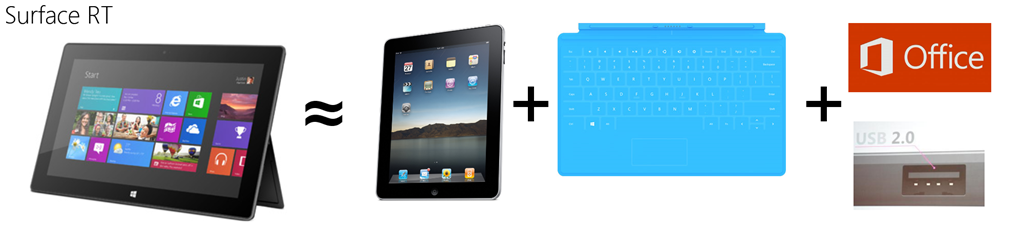
The funny thing is – radical as it’s design may be, Surface Pro is ‘just a PC’. As I showed in the ‘infographic’ above, it’s actually ‘just an Ultrabook’, in the same way an F22 is ‘just a jet airplane’. Surface Pro is the nth generation descendant of all the PC’s in the world, and it’s odd that it took a software company to let it see the light. Yet, the smaller, cheaper Surface RT is actually a much more remarkable and innovative design – it runs on total different hardware, that has an extremely long battery life, but still it runs Windows 8. Like I said, RT is more like a tablet. But, to make things more complicated, in a smart move to make their ‘tablet’ offering more attractive and not just another me-too, Microsoft have made it possible to attach a keyboard to Surface RT and ships you a fully licensed Home version of Office. You get the crown ‘desktop jewels’ for free. Office in a very portable box. So in stead of only a consumption device, Surface RT is also a content creation device. You can make Word documents, Excel sheets, PowerPoint presentations just like on any other PC. Using a traditional desktop program. You can even attach a mouse to it using it’s USB port. So your tablet can act like a PC to an extent. And here my infographic breaks down, and my F22 versus the wife’s car analogy as well. It’s like your wife’s car has this extra set of controls that can be used to fly short distances at limited height as well - wouldn’t she want have that to overcome traffic jams and red lights ;).

So a more accurate way to position RT next to the competition is like this:

RT3

There is this other funny side effect too – because Surface RT runs on different hardware, the ‘foundation’ of it’s Windows needed to be changed too. You can hardly see that on the outside, but it has profound effects, one of them being that Windows RT – the Windows version that runs on Surface RT - is completely impervious to viruses. It’s like trying infect a fish with the human common cold – DNA does not match, the organs that are needed for infection are simply not there.

So it comes down to this:

  • Surface Pro is a PC – it may look like a tablet and it can be used as a tablet, but it’s not its primary intended use. It’s a bit heavy for that and has this other characteristics that doesn’t make it the ideal tablet. Just like an F22 can be used on the highway – but it’s better in the air. You are doing development? Heavy gaming? Heavy duty photo or movie editing? This is the machine for you.
  • Surface RT is primary a tablet but can also be used for some PC (Office) tasks that used to require a full PC. It’s like a car that can fly a little, but it cannot carry deadly loads with it. You are doing office, mail and some content/web browsing, casual games, maybe a bit of movie watching? A lot of it on the go, removed from any outlet?  Try this one.

And of course, you can also try any other kind of device, running either Windows RT or Windows Pro (i.e. being equivalent to Surface RT and Surface Pro) to find out what suits your need. I give you only one golden rule – whatever you buy, Surface or no Surface, RT of Pro – make sure it has a touch screen. With touch Windows 8 really shines.

PS: In case anyone wonders whether or not I am happy with my choice for Surface Pro as a portable development machine – let me just quote my fellow MVP Rob Miles on that one: “HELL YEAH!”