05 October 2011

Wireless podcast sync on Windows Phone 7 outside USA–yes we can!

Sorry! No code here as well, but a usability tip.

Mango RTM came, the Dutch Marketplace went live, I nuked my HTC7 Pro and finally used my age-old live id as primary live id. I registered my credit card and bought my first apps. Now I knew in advance not all the cool features that were available when I still was running my fake live id based on a random ZIP code in Texas (I think) would still be there when I switched live id, but I was not prepared for was the fact that the whole podcast Marketplace part was missing. Fortunately there is a work-around for this: Zune downloads anything you know the RSS for. So if you want to listen to Windows Dev Podcast as I do every week, you just enter their RSS feed (http://feeds.feedburner.com/WindowsPhoneDevPodcast) and boom, Zune starts loading their podcasts.

But now I was back to downloading episodes via Zune again by attaching my phone to my computer. I was just getting used to letting the phone taking care of that – as soon as it was in Wi-Fi range of my home it started to check for new episodes and lo and behold, automagically Lowdermilk & Lowdermilk appeared on my phone, just as the DotNed podcast, Windows Phone Radio and more.

Turns out that once you have one episode downloaded on your phone via Zune, you can then start synching via Wi-Fi again. It’s dead simple.

  • Once you have synced a podcast episode over an USB cable via the Zune program to your phone, disconnect it
  • Open Zune on your phone
  • Tap “podcasts”
  • Tap the descriptive text of the podcast on the right, not the logo
  • You will get a list of downloaded episodes (default Zune downloads 3).
  • And a button “subscribe”

And then you are where you were before you lost the podcast Marketplace. Tap it, and you are basically done. From now on your phone will sync podcast episodes over Wi-Fi again. If this is by design or by accident, I don’t know, but it works.

03 October 2011

The Standard About Page for Windows Phone 7 revisited

Back to business!

Although section 5.6 requiring an application to have easily discoverable application name, version information, and technical support contact information is still in the Windows Phone 7 Application Certification Requirements, it is no longer strictly enforced as far as I know. Yet, it’s still a very good idea to include this. It allows your App’s buyers to quickly review and rate your App and moreover, contact you easily, and usually providing you with all kinds of free ideas to make your App even better. What is better than to get direct input from the very people who bought your App!

I wrote about a Standard About Page some time ago. The latest version is now included in the 2.0.1 version of my wp7nl library on codeplex, which is also available as a Nuget package. Apart from some minor improvements to the AboutViewModelBase (and the update to MVVMLight 4.0), by popular request I created a user control, or actually, multiple user controls.

If your reference the wp7nl library, you will get three “About” controls:

  • AboutContents
  • AboutData
  • AboutInfoSymbol

AboutData is the complete thing: create an empty page, delete everything within LayoutRoot Grid, drag this control in it, bind your AboutViewModelBase descendant, and you are ready. Apart from the namespace declarations, all that’s left of the contents of the About Page of my Map Mania App now looks like this:

<phone:PhoneApplicationPage.Resources>
  <Model:AboutViewModel x:Key="AboutViewModel"/>
</phone:PhoneApplicationPage.Resources>

<Controls:PhoneApplicationPage.Style>
  <StaticResource ResourceKey="PhoneAppStyle"/>
</Controls:ExtendedPhonePage.Style>
<Grid x:Name="LayoutRoot" Style="{StaticResource LayoutRootStyle}" 
   DataContext="{StaticResource AboutViewModel}">
  <Controls:AboutData/>
</Grid>

Again, by popular request this is built up out of of two sub controls, AboutContents (everthing below the actual “About”) and AboutSymbol (the info-symbol). A picture says more than a thousand words, therefore:

 About

This, for instance, allowed me to construct the About ‘page’ of Catch’em Birds as part of a Panorama view, using just the AboutSymbol and the Contents like this:

<controls:PanoramaItem x:Name="PanAbout" 
  Header="{Binding LocalizedResources.About, Source={StaticResource LocalizedStrings}}" 
  Margin="0,-1,0,0">
  <controls:PanoramaItem.HeaderTemplate>
    <DataTemplate>
      <Grid>
        <Grid.RowDefinitions>
          <RowDefinition Height="0.994*"/>
          <RowDefinition Height="0.006*"/>
        </Grid.RowDefinitions>
        <Grid.ColumnDefinitions>
          <ColumnDefinition Width="40"/>
          <ColumnDefinition Width="Auto"/>
        </Grid.ColumnDefinitions>
        <LocalJoost:AboutInfoSymbol HorizontalAlignment="Left" 
           VerticalAlignment="Bottom" Margin="0,0,0,6"/>
        <TextBlock Grid.Column="1" 
           Text="{Binding Content, RelativeSource={RelativeSource TemplatedParent}}" 
           FontSize="64" Margin="0" Grid.RowSpan="2" />
      </Grid>
    </DataTemplate>
  </controls:PanoramaItem.HeaderTemplate>
  <LocalJoost:AboutContents Name="aboutContents1" 
    DataContext="{Binding Instance.AboutViewModel, Source={StaticResource MainViewModel}}" />
</controls:PanoramaItem>

about2

Which yields the result as displayed on the left.

So now you can create an About Page with even less effort. You still have to make a child class of AboutViewModelBase and a resource file as described in the first About Page post but that’s about all.

A sample implementation of the whole stuff can be found here.

Have fun!

02 October 2011

Being spammed to MVP

This posting is not about code or anything. Skip it if you are searching for that ;)

I had a rotten day yesterday. I was tired from an extremely busy and stressed-out working week, I slept badly, and I was developing a severe cold while it finally looked like nice weather here. I was visiting my mum – who was relating about the funeral of my niece the day before. She had passed away out of the blue at 46, just four years older than me. This made me ponder about my own future, my dad who passed away at 48 (when I was only 15), stuff like that. A cheerful mood indeed.

In the godforsaken town my mum lives there’s hardly wireless internet, so I saw two or three MVP renewals trickling in, but could hardly respond. Nor was I really in the mood for it. Next stop were my parents-in-law, who live in the same town a couple of blocks away (yeah so I married the Girl Next Door, sue me ;) ) for a family BBQ. Fortunately no sick or dead relatives talk here, but to compensate for that I had developed a splitting headache. Picture the scene? “One of those days”.

So while I was listlessly munching away some BBQ stuff I wanted to show my Windows Phone 7 to my Android-using brother in law (his Facebook App was broken again) and for some reason noticed a revolving live tile with a twitter message congratulating new and renewed MVP’s in general and if everyone else could please check their spam folder? So I connected to my father-in-laws Wi-Fi network (he’s a bit more up-to-date than my mum), and still not believing anything I let my phone sync my gmail spam folder and picked it up again 10 minutes later or so.

I almost dropped my phone and I suppose I made some kind of strangled sound. I don’t quite remember, I think a few neurons fused out that moment ;) - just that my wife looked at me with that special worried ‘what the hell is wrong with YOU?’ look. I just showed her my phone. It read:

Congratulations 2011 Microsoft MVP!

Congratulations! We are pleased to present you with the 2011 Microsoft® MVP Award! This award is given to exceptional technical community leaders who actively share their high quality, real world expertise with others. We appreciate your outstanding contributions in Windows Phone Development technical communities during the past year.

She passed it to the people present and they all started to congratulate me. Still not believing it, I managed to retrieve my phone and contacted our local Windows Phone 7 DPE Matthijs Hoekstra (using – how fitting – Windows Phone 7 Live Messenger integration, or maybe Facebook chat, I did not quite pay attention to that) to check if no-one was pulling a sick joke on me. He confirmed it was the real thing and he was already wondering why he did not hear anything from me – it was more than 2.5 hours since the mails got out.

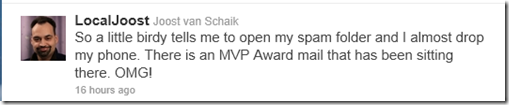
I can assure you even Windows Phone 7 auto correction had a hard time with my trembling hands (sneezing in the process does not help either), but I finally managed to get out
twitter

… and then my phone nearly exploded with congratulations, it was just impossible to keep up with it and thank everyone in person. It’s a bit lame, but hereby: thank you all for your good wishes and congratulations. I especially thank my fellow developers from #wp7nl who have nominated me. I hope to prove being worthy of this honor.

Just remember this: I will not deny being very proud of this, but I am still just Joost. I am an ordinary developer just like you, who got enthusiastic about Windows Phone 7. I like to tinker, code, write (and write about code), help out other people who got stuck if I can, share ideas and knowledge, on a user or developer level. Just because I have fun doing that, and I learn a lot in the process of doing so, too. Apparently I did this in a way that pleased some people within Microsoft to such an extent that they decided to praise me in public this way. I appreciate this very much, but I never was, nor will I ever be, a divine oracle of Windows Phone 7. Nor have I transcended to some god-like being.

So please don’t approach me differently because ‘wow he’s now an MVP’ right? Still ‘just Joost’, who will help if he can.

26 September 2011

Mango ‘Augmented Reality’ 101: showing a video background

Some things on Windows Phone 7.5 “Mango” are so easy that it’s almost embarrassing. Like showing a running video of what the camera is seeing on the background. So simple, in fact, that no-one ventures to describe it. And consequently, you might spend some fruitless time looking for it. I am therefore very thankful to Matthijs Hoekstra for sending me a piece of sample code that I condensed even more.

First, you need to make a new Windows Phone application for framework 7.1. In the MainPage.xaml, delete everything between the phone:PhoneApplicationPage, i.e. the complete grid “LayoutRoot”

Then, set SupportedOrientations and Orientation to "Portrait" and  shell:SystemTray.IsVisible to “False”

Then you add the following XAML code:

<Rectangle >
  <Rectangle.Fill>
    <VideoBrush x:Name="videoBrush" />
  </Rectangle.Fill>
</Rectangle>

And then you make sure the following code is in the MainPage.xaml.cs:

public MainPage()
{
  InitializeComponent();
  Loaded += MainPage_Loaded;
}

void MainPage_Loaded(object sender, RoutedEventArgs e)
{
  var cam = new PhotoCamera();
  videoBrush.SetSource(cam);
}

Deploy the app, and you will see the camera view on your screen. See what I mean by “embarrassingly simple”? Now do something funny with it ;-)

12 August 2011

New binding possibilities in Mango

Apart from all the goodness the new API’s in “Mango” bring us, there is that other great gift that it brings us: Silverlight 4. After spending so much time on Windows Phone 7 you would almost forget that there’s life after the ‘Silverlight 3+’ version that was the baseline up till now. This means for MVVMLight fans like me:

  • You can now directly bind a command to a button’s “Command” property. In fact, you can bind a command to anything that derives from ButtonBase. This includes HyperlinkButton, RadioButton, and CheckBox (and possibly more). If you bind commands to these user interface elements, you can now say goodbye to your good old friends EventTrigger and EventToCommand
  • If you want to use data from your model in a behavior, you can now bind directly bind data to dependency properties defined in the behavior itself, in stead of doing the attached dependency property dance, or resorting to the MVVMLight Messenger.

The first one saves a bucket load of XAML. Before Mango, you had to create something like this to fire a command by a button being clicked:

<Button Content="Start game">
  <Interactivity:Interaction.Triggers>
    <Interactivity:EventTrigger EventName="Click">
      <MvvmLight_Command:EventToCommand Command="{Binding StartNewGame, Mode=OneWay}"/>
    </Interactivity:EventTrigger>
  </Interactivity:Interaction.Triggers>
</Button>

Now you can write the same functionality like this:

<Button Content="Start game" Command="{Binding StartNewGame, Mode=OneWay}"/>

By no means this means the end of EventToCommand. First of all, it needs to be there for backward compatibility (unless you particularly like rewriting working XAML) .Second, there are plenty of cases for user interface elements that generate particular events that you might want to route to a model via a command. For example, I routinely signal my model a page has completed loading by attaching a command to it’s “Loaded” event. That still requires the EventTrigger-EventToCommand route.

For behaviors, the gain is a little bit less visible. But remember my little Windows Phone Drag/Flick behavior? That sports a dependency property BrakeSpeed that I could now bind to my ViewModel on all instances, thereby controlling all behaviors’ brake speed with one property. The same goes for my SetInitialOpacityBehavior, where I explicitly state that you cannot bind to its OpacityAfterLoading property:  “in Windows Phone 7 you cannot data bind it because it’s currently based on Silverlight 3 which only allow you to bind to classes that do descend from DependencyObject – which a behavior obviously does not ;-)”. Well, now you can, and this gives you a powerful and easy way to control behaviors from your ViewModel, and let behaviors push data back to it.

All in all, the ‘Silverlight4+’ in Windows Phone 7 “Mango”  gives us all the opportunities to make MVVMLight based applications even more easy and clean than they already were.

24 July 2011

MVVMLight based language selection for Windows Phone 7

Updated 25-09-2011 with a new implementation of LanguageSettingsViewModel to make it compatible with SilverlightSerializer. It appeared that every 2nd tombstoning of this viewmodel it lost it’s CurrentLanguage property Updated 01-02-2011 with bug fix in SetLanguageFromCurrentLocale

With the advent of the ‘Mango’ release of Windows Phone 7 with 19 more countries getting a Marketplace, supporting more than your own native language or English becomes all the more important. I can tell from personal experience that for instance supporting German gives a tremendous boost to your downloads. Tremendous as in: I get almost as much downloads from Germany as from the whole USA. Apparently Windows Phone 7 is doing pretty well in Germany. So take note of this ‘Geheimtipp’ ;-)

I implemented the following solution, based on MVVMLight 4, which upon first startup automatically tries to select a language based upon the current UI locale, and if that fails, tries to select one from the same group (for instance, if I only have en-UK it tries to select the first language that starts with “en”, for instance en-US). And of course you give the possibility of selecting another language manually.

It works like this. First, I define a very simple class that describes the base properties of a language, i.e. the locale (for instance en-US) and the way you want this language described:

using System;
using GalaSoft.MvvmLight;

namespace Wp7nl.Globalization
{
  /// <summary>
  /// Supported languages
  /// </summary>
  public class Language : ViewModelBase, IEquatable<Language>
  {
    private string locale;
    public string Locale
    {
      get { return locale; }
      set
      {
        if (locale != value)
        {
          locale = value;
          RaisePropertyChanged(() => Locale);
        }
      }
    }

    private string description;
    public string Description
    {
      get { return description; }
      set
      {
        if (description != value)
        {
          description = value;
          RaisePropertyChanged(() => Description);
        }
      }
    }

    public override string ToString()
    {
      return Description;
    }

    public bool Equals(Language other)
    {
      return other != null && other.Locale.Equals(Locale);
    }

    public override bool Equals(object obj)
    {
      return Equals(obj as Language);
    }

    public override int GetHashCode()
    {
      return Locale.GetHashCode();
    }
  }
}

I may look like a lot but it’s only two properties and an implementation of Equals. I implemented it as a full view model, which is actually a bit overkill, but I tend to do this since I have a couple of code snippets that make this pretty easy anyway. The second class does actually all the work:

using System.Collections.ObjectModel;
using System.Globalization;
using System.Linq;
using System.Threading;
using GalaSoft.MvvmLight;

namespace Wp7nl.Globalization
{
  /// <summary>
  /// A ViewModel class to handle language settings. 
  /// Override this class and add languages in the constructor
  /// </summary>
  public class LanguageSettingsViewModel : ViewModelBase
  {
    public LanguageSettingsViewModel()
    {
      AddLanguages(new Language { Description = "English", Locale = "en-US" });
    }

    private readonly ObservableCollection<Language> supportedLanguages =
       new ObservableCollection<Language>();

    /// <summary>
    /// Gets the supported languages.
    /// </summary>
    public ObservableCollection<Language> SupportedLanguages
    {
      get { return supportedLanguages; }
    }

    /// <summary>
    /// Determine current language
    /// </summary>
    /// <returns></returns>
    private Language GetDefaultLanguage()
    {
      // Try to select from current UI thread on full name
      var language = SupportedLanguages.Where(
        p => p.Locale == Thread.CurrentThread.CurrentUICulture.Name).FirstOrDefault();
      if (language == null)
      {
        // Try to select from current UI thread on 2 letter ISO code
        language =
          SupportedLanguages.Where(
            p => p.Locale.StartsWith(
              Thread.CurrentThread.CurrentUICulture.TwoLetterISOLanguageName)).FirstOrDefault();
      }
      if (language == null)
      {
        // Still no language: take the first one that starts with English
        language = SupportedLanguages.Where(p => p.Locale.Contains("en")).First();
      }

      return language;
    }

    private Language currentLanguage;
    /// <summary>
    /// Gets or sets the current language.
    /// </summary>
    /// <value>
    /// The current language.
    /// </value>
    public Language CurrentLanguage
    {
      get
      {
        return currentLanguage;
      }
      set
      {
        if (currentLanguage != value)
        {
          currentLanguage = value;
          RaisePropertyChanged(() => CurrentLanguage);
        }
      }
    }


    /// <summary>
    /// Sets the language from current locale.
    /// </summary>
    public void SetLanguageFromCurrentLocale()
    {
      if (CurrentLanguage == null)
      {
        CurrentLanguage = GetDefaultLanguage();
      }
      Thread.CurrentThread.CurrentUICulture = new CultureInfo(CurrentLanguage.Locale);
      Thread.CurrentThread.CurrentCulture = Thread.CurrentThread.CurrentUICulture;
    }

    /// <summary>
    /// Adds the languages.
    /// </summary>
    /// <param name="languages">The languages.</param>
    public void AddLanguages(params Language[] languages)
    {
      if (languages != null && languages.Count() > 0)
      {
        foreach (var l in languages)
        {
          if (!supportedLanguages.Contains(l))
          {
            supportedLanguages.Add(l);
          }
        }
      }
    }
  }
}

Out of the box this thing only supports English-USA. To add more languages, you subclass this model and add your own languages:

using Wp7nl.Globalization;

namespace YourApp.ViewModels
{
  public class MyLanguagesViewModel : LanguageSettingsViewModel
  {
    public LanguageViewModel()
    {
       AddLanguages(new Language { Description = "Nederlands", Locale = "nl-NL" });
       AddLanguages(new Language { Description = "Deutsch", Locale = "de-DE" });
    }
  }
}

screenshot_7-24-2011_13.44.6.244Directly after you have created MyLanguagesViewModel, or retrieved it from tombstoning using my extension methods based upon SilverlightSerializer, you simply call the SetLanguageFromCurrentLocale and that either restores the selection last made by the user in the application itself, or tries to find the language that best fits what the user has selected as locale on his phone. To give the user an option to select a language you can, for instance, bind the models’ SupportedLanguages property to the ItemsSource property of a ListPicker and the CurrentLanguage to its SelectedItems property.

In my as of yet unreleased Mango version of Map Mania this looks like as displayed on the right:

This leaves, of course, still two things to do:

  1. Defining resources files with with the actual text
  2. Implement a class that makes these resource files bindable

This procedure is shown in the Windows Phone 7 Globalization Sample provided on MSDN so I won’t repeat them here.

23 July 2011

Speed and distance calculation extension methods for Windows Phone 7

Upgrading stuff to from Windows Phone 7 to “Mango” is sometimes like cleaning your desk drawer before going on a holiday – you stumble upon stuff you forgot it was even there. For the ‘game engine’ I made for Catch’em Birds I created a few very handy extension methods for calculating speed and distance, which I would like to share with the rest of the community:

using System;
#if WINDOWS_PHONE
using System.Windows;
#else
using System.Drawing;
using System.Windows;
#endif


namespace Wp7nl.Utilities
{
  public static class PointExtensions
  {
    /// <summary>
    /// Distances from point 1 to point 2
    /// </summary>
    /// <param name="p1">The first point.</param>
    /// <param name="p2">The second point.</param>
    /// <returns></returns>
    public static double DistanceFrom(this Point p1, Point p2)
    {
      var dX = p2.X - p1.X;
      var dY = p2.Y - p1.Y;
      return Math.Sqrt(dX * dX + dY * dY);
    }

    /// <summary>
    /// Calculates the speed in pixels per second
    /// </summary>
    /// <param name="p1">The first point.</param>
    /// <param name="p2">The second point.</param>
    /// <param name="duration">The duration</param>
    /// <returns>Speed in pixels per second</returns>
    public static double CalculateSpeed(this Point p1, Point p2, Duration duration)
    {
      return p1.DistanceFrom(p2) / duration.TimeSpan.TotalSeconds;
    }

    /// <summary>
    /// Calculates the duration given a distance and a speed.
    /// </summary>
    /// <param name="p1">The first point.</param>
    /// <param name="p2">The second point.</param>
    /// <param name="speed">The speed in pixels per second.</param>
    /// <returns>Time it takes to get from p1 to p2</returns>
    public static Duration CalculateDuration(this Point p1, Point p2, double speed)
    {
      return new Duration(TimeSpan.FromSeconds(p1.DistanceFrom(p2) / speed));
    }
  }
}

I will discuss these in a not quite logical order:

  • The first method is of course good ole' Pythagoras caught in an extension method, basically there as a helper method for the other two.
  • The third method is the one I used most: given that my object needs to move from p1 to p2 with a given speed in pixels per second, what’s the Duration I need to apply to my Storyboard?
  • The second one is the inverse – given the fact that on object was moving from p1 to p2 in duration “duration”, calculate its speed in pixels per second.

As you can see at the #if on top it also work on System.Drawing.Points under full .NET 4.0. Maybe these methods are useful there as well, I put that only there to facilitate some unit tests.

All these methods are part of the wp7nl CodePlex library – or at least the will so at the upcoming Mango release.

Update: thanks to Rene Schulte for pointing out to me that my original DistanceFrom method using Math.Pow is very slow compared to simple multiplications. Rene is a Silverlight MVP from Dresden, Germany and has some very nice Point extension methods on his blog “Kodierer” as well - in English, don’t worry ;-)